

Payment Link
Accept Payments Without an Online Shop
Whether you sell via social commerce, take orders over the Phone, or send customers individual offers, paying needs to be as straightforward as possible. Our Payment Link lets you add a checkout to a chat, email & other messages, or share it as a QR code, without an online shop of your own.
The Benefits to You
One Link, One Click, One Payment
Take orders easily via WhatsApp, email, or social media. With a link or QR code, virtually any channel can lead customers to your checkout.
Sell Through More Channels
A payment link takes your customers straight to the payment page, reducing the obstacles that can get in the way of completing a purchase. This flexible solution makes paying quick and secure, even without your own online shop infrastructure.
Our Solution
How Payment Link works
Go from a payment request to a completed transaction in just a few steps.
1
Create the Link
Create the link manually in secuOffice or fully automatically through the secuconnect API.
2
Send the Link
Send the link by email, WhatsApp or social media, or include a QR code in a letter.
3
Make the Payment
The customer opens the secure payment page, chooses a payment method, and confirms the payment.
4
Track the Status
View payment statuses in secuOffice and continue managing the payments there.
Two Ways, One Result
Two Ways to Use Payment Link
For Individual Payments
secuOffice
Create payment links directly in the merchant portal: Enter the amount and customer details, then generate and send the link. You can copy existing links, send them again or use them for further payments.
Ideal for
- Call centres
- Field sales teams
- Individual orders
- Special cases
For Automated Processes
secuconnect API
Create payment links directly from your existing ERP, CRM, accounting, or other systems. The relevant transaction data is sent to secupay and used to generate a payment link for that transaction.
Ideal for
- Automated payment requests
- ERP and CRM workflows
- Higher transaction volumes
Flexible Integration
Let Your Customers Pay the Way They’re Used To
With Payment Link, you can offer several online payment methods in a single checkout, including:




- Credit cards
- SEPA direct debit
- PayPal
- Prepayment
- Pay by Bank
- Other payment methods, depending on the integration
The payment page supports strong customer authentication, including 3-D Secure for card payments. This makes remote transactions more secure and reduces the risks involved in processing payments. Credit card data is processed in compliance with PCI DSS.
Our Pricing Plans
The Right Pricing Plan for Your Business
Starter Plan
Plan Details
Activation
49,00 €
Monthly service charge
€0.00
Transaction fee
€0.25
Fair processing fees
Credit cards
1,70 %
Lastschrift und
Purchase on account
1,20 %
Prepayment/collecting service
0.95%
Pay by Bank
0.95%
PayPal* (ohne Collecting)
Plus Plan
Plan Details
Activation
49,00 €
Monthly service charge
€9.50
Transaction fee
0,20 €
Fair processing fees
Credit cards
1.25%
Lastschrift und
Purchase on account
0,90 %
Prepayment/collecting service
0.80%
Pay by Bank
0.80%
PayPal* (ohne Collecting)
Premium Plan
Plan Details
Activation
49,00 €
Monthly service charge
€27,50
Transaction fee
€0.15
Fair processing fees
Credit cards
0.95%
Lastschrift und
Purchase on account
0.45%
Prepayment/collecting service
0.45%
Pay by Bank
0.45%
PayPal* (ohne Collecting)
Which Plan Is Right for Me?
Speak to our experts!
Monday to Friday,
9 AM to 5 PM
Plus
- No minimum contract term
* You’ll need a PayPal merchant account with a PayPal Client ID.
secupay AG’s General Terms and Conditions, Special Terms for Payment Services, and Schedule of Prices and Services apply. Fees for payment services, including percentage-based processing fees and transaction charges, are exempt from VAT under section 4 no. 8(d) of Germany’s Value Added Tax Act (UStG). VAT at the statutory rate is added to the prices of taxable services, such as terminal hire, software services, and special analyses.
Get Started Now
Choose a Plan and Request a Quote
secuOffice
Keep Track of Every Payment
There’s more to each payment link than clicking ‘Pay’. In secuOffice, you can check payment statuses, view transaction details and continue managing the links you’ve generated, all in one place.
- Included free of charge
- Status of each payment link: unpaid, paid or cancelled
- Detailed view of payment status, payment method, and transaction details
- Copy payment links, send them again or use them for further payments
- Structured data and reports for the next stages of your workflow
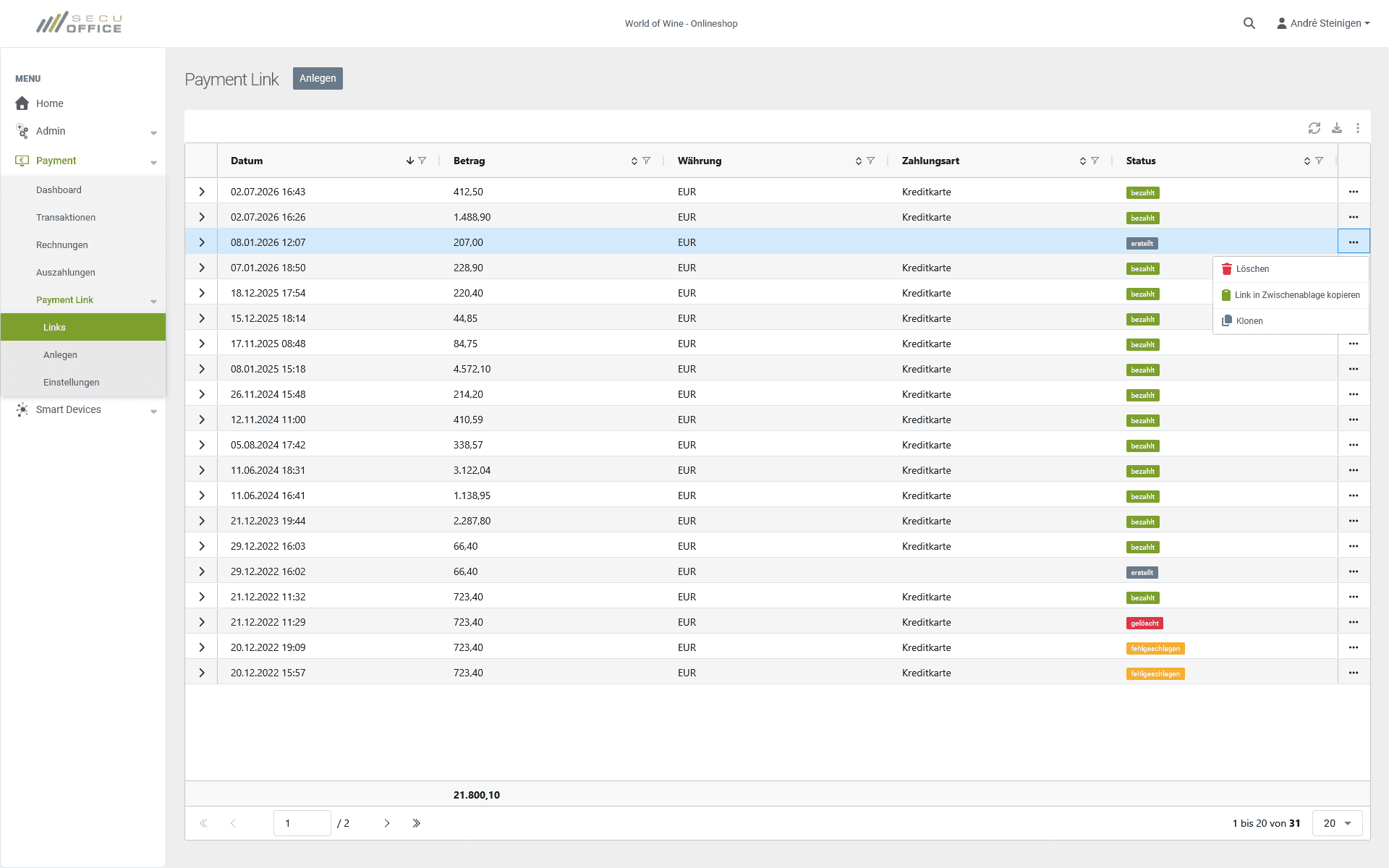
Create, track and manage your payment links in secuOffice, where you can always see how things stand.
Use Cases
Turn Every Customer Touchpoint into a Checkout
Payment links have many uses and are particularly useful when customers can’t pay through an online shop’s checkout.
Discuss Your Payment Link Requirements
How Payment Link
Can Benefit Your Business
Whether customers order by phone, receive payment requests by email, or buy through social media, Payment Link gives them a simple, secure way to pay. Get advice on how to use this tool to suit your business.